Connect Wissen to Claude
Connect Wissen once on Claude web. Your remote connector is then available across Claude Desktop, Claude Code and the Claude Office add-ins when you use the same account.
Before you start
- A work email with Wissen accessSign in with it. Adding the connector doesn’t grant research access by itself.
- Your own Claude accountIn Team or Enterprise, an owner may need to add or enable Wissen for the workspace first.
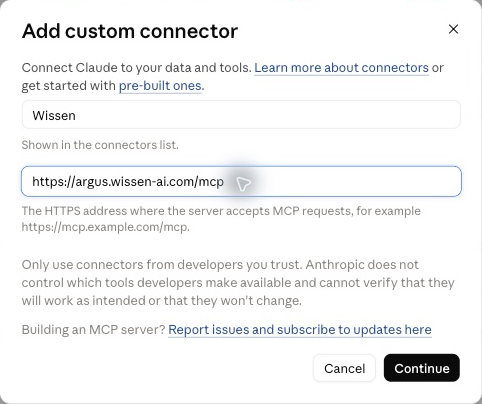
Connect Wissen
Open Claude’s connectors
Customize, then Connectors
Wissen already listed? Connect your account there instead of adding a duplicate.
Open Claude connectors (opens in a new tab)Connect your account
Sign in with the work email your firm has enabled.
Review the connection request and return to Claude when it finishes.
Check it works
+, then Connectors
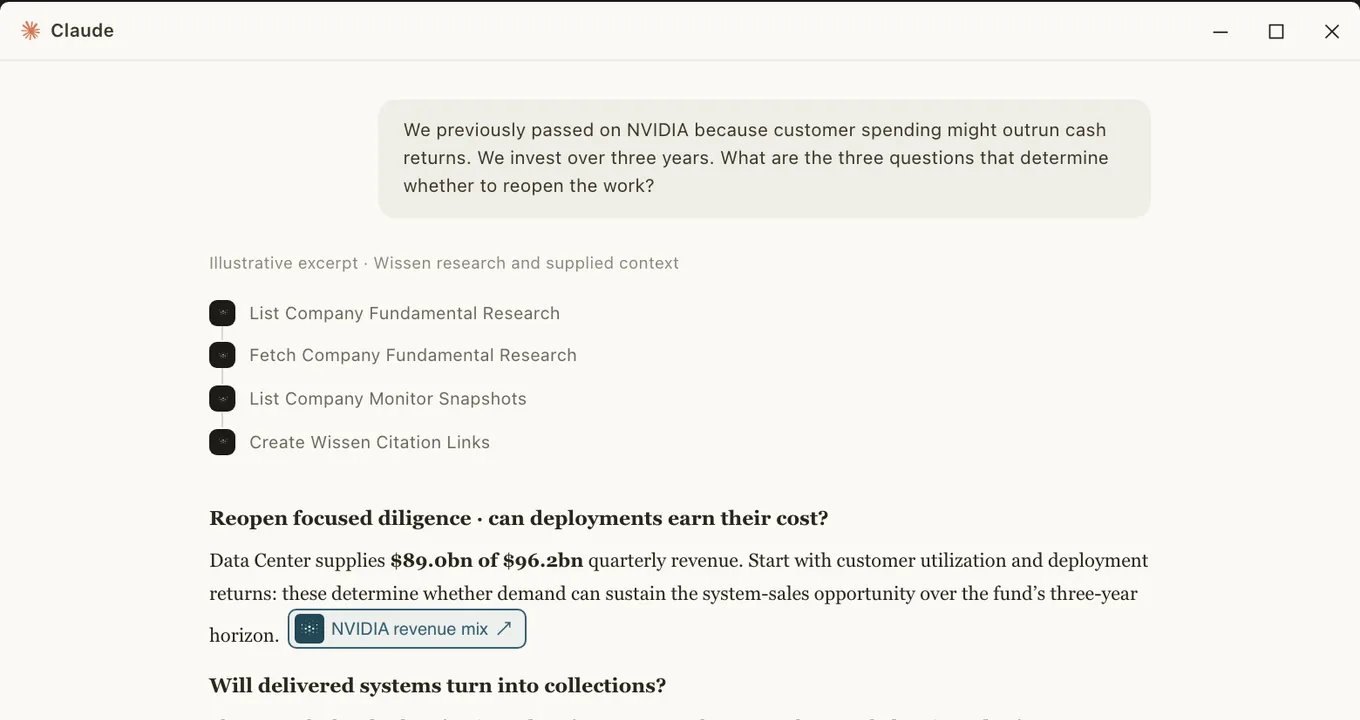
Enable Wissen in a new chat, then paste:
Connection checkUse the Wissen connector to call fetch_guide with guideId "getting-started" and show the first three workflow steps. Do not list equities or fetch company research. Reply in the chat only; do not edit any workbook, document, presentation, or other record. If the connection fails, report the error instead of guessing.You should see something like this
- Call
list_equitiesto find the companies available to the user. - Choose the research that best matches the question.
- Call the relevant
list_*tool to discover the available research.
A saved server address or an enabled toggle alone isn’t a passing check. Not seeing this? Go to If it doesn’t connect.
- Call
Use Wissen across your apps
Sign in to each app with the same Claude account; no need to add the server again.
- Claude webReadyEnable Wissen from + › Connectors in a new chat.
- Claude desktopRestart the appSign in to the same account and workspace, quit and reopen the app, then enable Wissen from + › Connectors in a new chat.
- Claude CodeRestart sessionSign in with the same Claude subscription account and restart your session. Run /mcp to see the connector; no separate server command is needed.
 Claude for ExcelInstall the add-inInstall the Claude add-in, sign in directly with the same Claude account, then select Wissen from + › Connectors.
 Claude for WordInstall the add-inInstall the Claude add-in, sign in directly with the same Claude account, then select Wissen from + › Connectors.
The web connection is a one-time setup per Claude account and workspace. API-key and cloud-provider logins don’t inherit your Claude account connectors.
In Excel and Word, ask for Wissen by name
Select Wissen in the add-in’s connector controls and name it in your prompt. Otherwise a general research request may use the workbook, document or web without calling Wissen.
Use Wissen MCP to retrieve the latest company research for [company]. Summarize the findings and include the source links. If Wissen MCP is unavailable, tell me instead of substituting another source. Reply in the sidebar first; do not change the workbook or document yet.Check that the reply actually used a Wissen tool. Naming Wissen doesn’t enable a connector the add-in doesn’t have.
If it doesn’t connect
Wissen is on the web but missing elsewhere›
Check that the app uses the same Claude account and workspace, then restart it. In an Office add-in, sign in directly with Claude. In Claude Code, use a subscription login rather than an API key or cloud-provider credentials and check /mcp. A local entry with the same name can override the account connector.
I can connect, but research access is denied›
Check which email you used to sign in to Wissen. If it is correct, ask your firm’s Wissen administrator to check your access. Reinstalling the connector does not add access.
Sign-in does not finish›
Keep the sign-in tab open until the app confirms the connection. If the session expired or you chose the wrong account, reconnect from the provider’s connector settings. Never paste a password, access token, or browser callback URL into a chat.
Anthropic documentation
For the latest connector controls and availability.